Highcharts® React

A first-class, JSX-native charting library built for the way you write React today: components, hooks, state, TypeScript, and Next.js included.

npm install highcharts @highcharts/react

Highcharts for React Key Features

Reactive by design

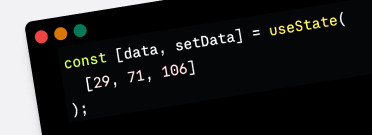
Charts respond to state and prop changes automatically. Bind data to useState, useReducer, or any state manager (Redux, Zustand, Jotai) and the chart re-renders only what changed. No imperative chart.update() calls.

Read about Reactive updates in the docs.

TypeScript-first

Full TypeScript declarations are bundled in the npm package, no @types/ package needed. Get autocomplete for every option, prop, and event in VS Code and other TS-aware editors. Fully compatible with strict mode and modern moduleResolution: bundler settings.

Explore our TypeScript docs.

Next.js & SSR ready

Works out of the box with Next.js App Router and Pages Router. Add 'use client' to your chart file, fetch data in Server Components, and render charts client-side. No special configuration needed.

Read more about SSR in our Next.js docs.

Custom Component Integration

Use your design-system components directly inside tooltips, data labels, and point renderers , rendered as real React, not injected HTML. No dangerouslySetInnerHTML, no DOM escape hatches.

Read more about configuring components in our Format Components docs.

Full Support for ES Modules

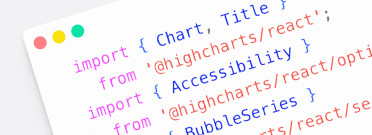
Deep imports like @highcharts/react/series/ Line tell bundlers like Vite, Webpack and Turbopack exactly what to include. Tree-shake down to only what your app needs.

Learn how to optimize Highcharts bundles in our Bundle and Treeshaking docs.

Supports All Chart Types

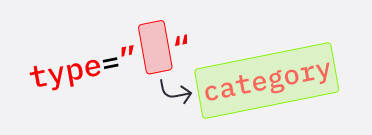
Every Highcharts chart type has a dedicated JSX entry point, from <Series type="line">, <StockChart>, <MapChart>, <GanttChart> and more. Your import maps directly to your intent.

Take a look at our demos to see the full list of data visualization types.

Frequently Asked Questions

Yes. @highcharts/react is the new official Highcharts React integration, built from scratch with a JSX-native API. If you’re starting a new project, use @highcharts/react. If you’re migrating an existing project, see our v4 migration guide.

@highcharts/react requires React 18.3.1 or newer, and Highcharts 12.2 or newer. It works out of the box with Vite, Webpack, and Turbopack, and is fully compatible with Next.js App Router and Pages Router.

No. TypeScript declarations are bundled directly in the npm package — no @types/ install needed. You get full autocomplete for every prop, option, and event in VS Code and other TS-aware editors automatically.

Yes. Add 'use client' to your chart file, fetch data in Server Components, and render charts client-side. Both App Router and Pages Router are fully supported with no additional configuration.

@highcharts/react is free for non-commercial use. For commercial projects, a Highcharts license covers the integration. See pricing or contact sales if you need help choosing the right plan.

Join Our
Discord Server

Got a question about your React integration? The official Highcharts Discord is where developers share what they’re building, get help from the community, and hear directly from the Highsoft team. Come say hi.

Migrating from highcharts-react-official?

The new @highcharts/react package replaces highcharts-react-official with a JSX-native API that’s faster, cleaner, and built for how React developers actually work. Migration takes minutes. Swap the package, update your imports, and you’re done.

Robustify Highcharts